

Voice communication has changed dramatically over the past decade. Businesses no longer depend only on physical phone lines and on site hardware to make calls. Instead, many organizations now rely on cloud connected audio systems that transmit voice data over the internet using cloud infrastructure. This shift has made communication faster, more flexible and easier to scale across multiple locations, while also lowering the maintenance burden that comes with owning and running physical telephony equipment.
In this article, we will break down the architecture behind cloud-connected audio, explain how its components work together, walk through the call workflow step-by-step and cover the network design principles that keep these systems running smoothly.
What Is Cloud-Connected Audio?

Cloud-connected audio architecture refers to the underlying system design that allows voice signals to travel over the internet through cloud-based servers rather than traditional copper phone lines. Instead of routing calls through a physical private branch exchange , cloud-connected audio uses Internet Protocol networks to carry data between devices.
This architecture combines hardware, software and network protocols to create a seamless communication experience. Whether it’s a customer support call, a team meeting or a voice enabled application, this setup makes it possible to connect people without relying on legacy telecom infrastructure.
Definition and Core Concept
At its core, this technology is about converting analog voice signals into digital data packets, sending those packets across the internet and reconstructing them into audio on the receiving end. The cloud part of the equation means that the servers responsible for processing, routing and managing these calls are hosted remotely rather than on a company’s own premises, giving organizations access to enterprise grade infrastructure without owning any of it.
How It Differs from Traditional Audio Systems
Traditional audio systems like standard PBX setups require physical wiring, on-site servers and dedicated hardware. Every extension is tied to a physical line and scaling the system means installing more equipment. Cloud-connected audio removes this dependency. Because everything runs through the internet and cloud servers, businesses can add new users, locations or features without installing new hardware. This makes the overall system significantly more flexible and cost effective for growing organizations, particularly those with remote teams spread across different cities or countries.
Core Components of Cloud-Connected Audio
To understand how this system works, it helps to look at the individual building blocks that make up the architecture. Each component plays a specific role in ensuring calls are initiated, transmitted and completed successfully and a failure in any single piece can affect the overall call experience.
Endpoints
Endpoints are the devices people use to make and receive calls. In this type of environment, endpoints can take many forms, from physical desk phones to software applications running on a computer or smartphone.
Hardware Endpoints
Hardware endpoints include IP phones and dedicated conferencing devices. These are physical devices that connect directly to the network and are configured to work with cloud-based communication platforms. They function similarly to traditional phones but use internet protocols instead of analog signals.
Software-Based Endpoints
Software-based endpoints, often called softphones are applications installed on computers or mobile devices. These tools allow users to make calls using their existing internet connection without needing any dedicated hardware. Softphones have become increasingly popular because they support remote work and reduce the cost of deploying physical devices.
Media Gateways
Media gateways act as translators between different types of networks. For example, if this kind of system needs to communicate with a traditional phone network, the media gateway converts the digital data into a format that the older system can understand and vice versa. This component is essential for organizations transitioning from legacy systems to modern cloud-based solutions, especially those still operating older PBX equipment alongside newer infrastructure.
Cloud Media Servers
Cloud media servers are responsible for processing and routing voice data during a call. These servers handle tasks like mixing audio streams, adjusting call quality and ensuring that data reaches its destination without significant delay.
Role of Media Servers in Call Processing
Media servers manage the real-time processing of audio streams. They handle tasks such as compressing audio data, converting formats when necessary and coordinating multiple participants in a conference call.
Load Balancing Across Servers
Because these systems often handle thousands of simultaneous calls, load balancing becomes critical. Multiple media servers work together to distribute call traffic evenly, preventing any single server from becoming overwhelmed and ensuring consistent call quality even during peak business hours.
Signaling Servers
Signaling servers manage the setup, control and teardown of calls. Before any audio data is exchanged, signaling servers handle the negotiation process that establishes a connection between two endpoints. This includes verifying user identities, determining call routing and setting up the parameters for the audio session.
How the Workflow Functions Step by Step
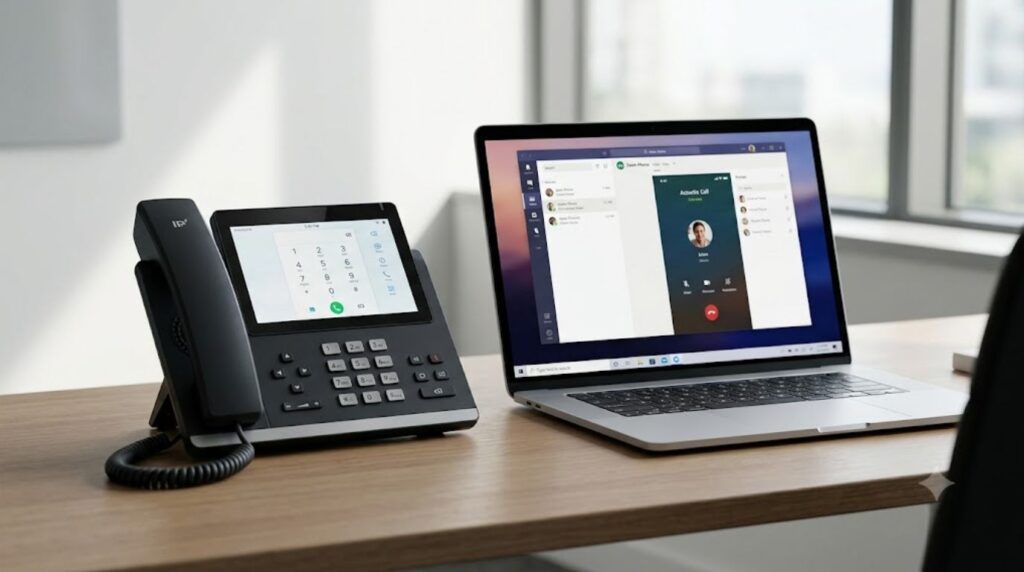
Understanding the components is only part of the picture. To fully grasp how the architecture functions, it’s important to see how these pieces work together during an actual call, from the first ring to the moment the connection closes.
Call Signaling Phase
The first phase of any call involves signaling which establishes the connection between two parties before any audio is transmitted.
SIP Registration Process
Before a device can make or receive calls, it must register with the network using the Session Initiation Protocol.This process verifies the device’s identity and makes it discoverable within the wider system.
Call Setup Handshake
Once registered, the calling device sends a request to initiate a session. The receiving device responds and both sides exchange information about supported audio formats, network addresses and other technical details needed to establish the connection.
Media Transmission Phase
After the signaling phase is complete, the actual audio data begins to flow between the two endpoints.
RTP Packet Flow
The Real Time Transport Protocol is responsible for carrying the actual voice data. Audio is broken into small packets, each labeled with sequencing information and sent across the network. This ensures that even if packets arrive out of order, they can be reassembled correctly on the receiving end.
Real-Time Data Handling
Because voice communication happens in real time, the system must process and deliver audio packets with minimal delay. Cloud-connected audio platforms are designed to prioritize this traffic to maintain natural, uninterrupted conversation flow.
Call Teardown Phase
When a call ends, the signaling servers handle the teardown process, releasing network resources and closing the session. This ensures that server capacity is freed up for other calls and that no lingering connections remain open unnecessarily.
Key Protocols Behind Cloud-Connected Audio
Several protocols work together to make this kind of voice communication possible. Understanding these protocols helps explain why the system behaves the way it does.
SIP
Session Initiation Protocol also known as SIP is the backbone of call signaling in most modern voice systems. It handles the initiation, modification and termination of voice sessions, making it one of the most important protocols in the entire architecture.
RTP (Real-Time Transport Protocol)
While SIP manages the setup of a call, Real-Time Transport Protocol also known as RTP is responsible for delivering the actual audio content. It is optimized for real-time performance, which is essential for maintaining clear and continuous voice communication.
WebRTC
WebRTC is a more recent addition to the cloud-connected audio ecosystem, enabling voice and video communication directly through web browsers.
Browser Based Audio Without Plugins
One of the biggest advantages of WebRTC is that it doesn’t require users to install any additional software or plugins. This makes it especially useful for web based applications that need built in voice capabilities.
WebRTC vs Traditional SIP
While SIP typically requires dedicated applications or hardware, WebRTC operates natively within browsers. This makes WebRTC a popular choice for customer support widgets, in app calling features and other browser based communication tools.
Network Design Best Practices

A well designed system is essential for reliable voice performance. Poor network planning can lead to dropped calls, poor audio quality and frustrated users.
Bandwidth Planning
Voice traffic requires consistent, dedicated bandwidth to function properly. Organizations need to calculate expected call volumes and ensure their network can handle simultaneous audio streams without congestion. A good starting point is to estimate the maximum number of concurrent calls during peak hours and then add extra headroom for unexpected spikes, such as company-wide announcements or emergency situations that generate a sudden surge in call volume.
Quality of Service (QoS) Configuration
QoS settings allow network administrators to prioritize voice traffic over less time-sensitive data, such as file downloads or email. This ensures that voice calls receive the bandwidth they need, even during periods of high network usage.
Redundancy and Failover Design
Reliability is critical for any communication system. Redundancy ensures that if one server or network path fails, another can take over without interrupting service.
Active-Active vs Active-Passive Setup
In an active-active configuration, multiple servers handle traffic simultaneously, sharing the load. In an active-passive setup, a backup server remains idle until the primary system fails, at which point it takes over. Both approaches aim to minimize downtime for voice services.
Firewall and NAT Traversal
Firewalls and network address translation (NAT) can sometimes interfere with voice traffic, since they were originally designed for other types of data. Cloud-connected audio systems need specific configurations to ensure calls pass through these barriers smoothly.
STUN and TURN Servers Explained
STUN and TURN servers help devices behind firewalls or NAT establish direct connections for real-time communication. These tools are essential for ensuring that cloud-connected audio calls can reach their destination, even in complex network environments.
Common Architecture Mistakes to Avoid

Cloud-connected audio
Ignoring Bandwidth Requirements
Underestimating bandwidth needs is one of the most common mistakes organizations make. This often results in poor call quality, especially during peak usage hours.
Poor Redundancy Planning
Failing to build in proper redundancy can lead to significant downtime if a server or network component fails. This is particularly damaging for businesses that rely heavily on voice communication for daily operations.
Overlooking Security in Early Design
Security should never be an afterthought. These systems often carry sensitive business conversations, customer data and confidential negotiations, so failing to build in proper encryption and authentication from the start can expose an organization to serious risks, including eavesdropping, call fraud and regulatory penalties in industries with strict compliance requirements.
Conclusion
Cloud-connected audio architecture brings together endpoints, gateways and cloud-based servers to deliver reliable, internet-driven voice communication. By understanding its core components, the step-by-step workflow and the protocols that power it, IT teams can design networks that are fast, secure and built to scale. A well planned cloud-connected audio system not only improves call quality but also lays the groundwork for future upgrades, from performance optimization to advanced security measures covered elsewhere in this series.
FAQs
How much bandwidth does a single cloud-connected audio call typically use?
A standard voice call typically uses between 64–100 Kbps per call, depending on the codec used. High definition voice codecs can use up to 128 Kbps, so organizations should factor codec choice into their bandwidth calculations.
Can cloud-connected audio work without an internet connection?
No, cloud-connected audio requires an active internet connection since all signaling and media data are routed through cloud servers.
What is the typical cost difference between cloud-connected audio and traditional PBX systems?
Cloud-connected audio generally costs less upfront since it eliminates the need for physical PBX hardware, though ongoing subscription fees vary by provider. Traditional PBX systems usually have higher initial capital costs but may have lower long term per-user fees in very large deployments.
How long does it typically take to fully deploy a cloud-connected audio system for a mid-sized company?
Deployment timelines vary but a mid-sized company can typically expect a rollout period of 2 to 6 weeks, depending on network readiness, integration needs and staff training requirements.
Is cloud-connected audio suitable for industries with strict compliance requirements, like healthcare or finance?
Yes, many cloud-connected audio providers offer compliance-ready solutions that meet standards like HIPAA or PCI-DSS but organizations must specifically verify these certifications with their chosen vendor before deployment.
What happens to an ongoing call if a cloud media server crashes mid-conversation?
In a properly redundant setup, the call can often be seamlessly handed off to a backup server without the user noticing. In systems without redundancy, the call would likely drop and need to be manually reconnected.
Can cloud-connected audio integrate with CRM or helpdesk software?
Yes, most modern cloud-connected audio platforms offer APIs or pre-built integrations with popular CRM and helpdesk tools like Salesforce, HubSpot or Zendesk, allowing call data to sync automatically with customer records.





gemma.marshall112@gmail.com
August 4, 2026Hi,
I was just looking at invisigals.com and wanted to ask: are you looking to scale your Instagram presence right now?
We help brands like yours add 300+ targeted Instagram followers every month using manual outreach and ads. We can grow your existing page or even build a brand-new profile from scratch for you if you’d prefer a fresh start.
Would you like me to send over some more info on how it works?
Thanks for your time,
Gemma