
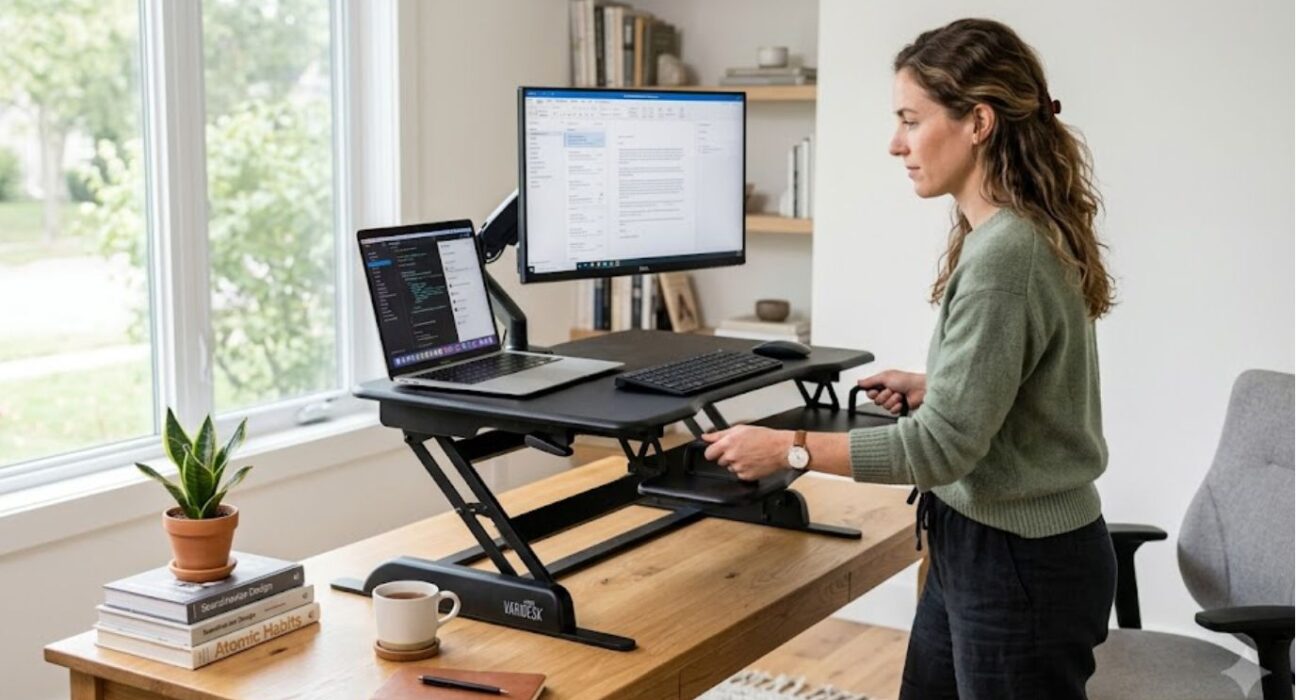
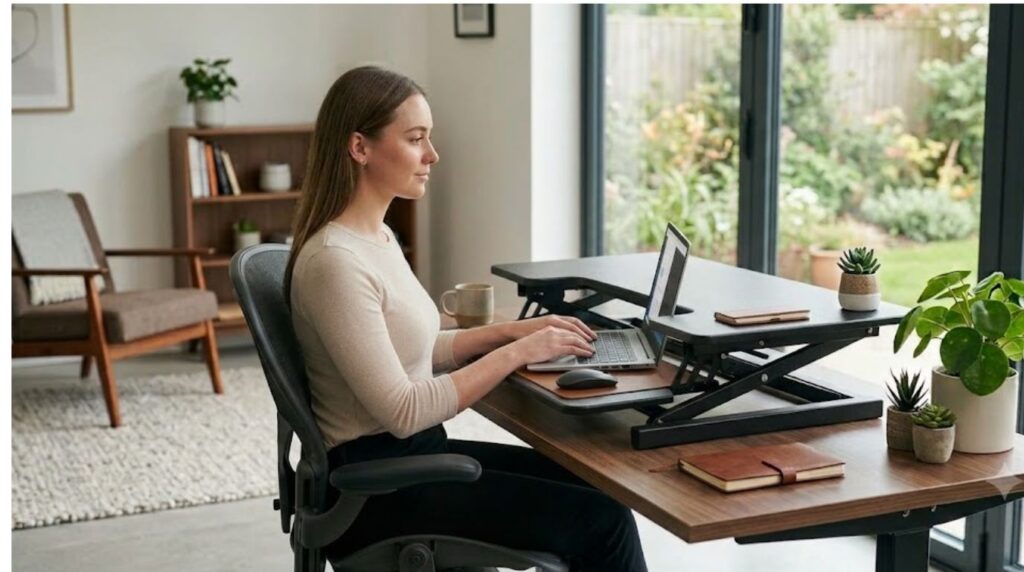
If you have ever asked yourself, What is a riser desk? you are not alone, it is a common question for people. Many ask it when they want a healthier, more flexible workday. In practical terms, a riser desk is a compact, height adjustable accessory placed on top of a regular desk.
Unlike a full standing desk, it works with the furniture you already have. It usually offers a raised platform for your monitor. It also has a lower platform for your keyboard and mouse. No setup or additional tools are required.
It has become one of the easiest ways for remote and hybrid workers to move more each day. Best of all you can set it up in minutes and start switching between sitting and standing right away.
By the end of this guide, you’ll clearly understand what is a riser desk, how it works and whether it’s the right choice for your workspace. To fully understand what is a riser desk, it’s important to see how its height adjustable mechanism functions in everyday use.
What Is a Riser Desk and How Does It Work?
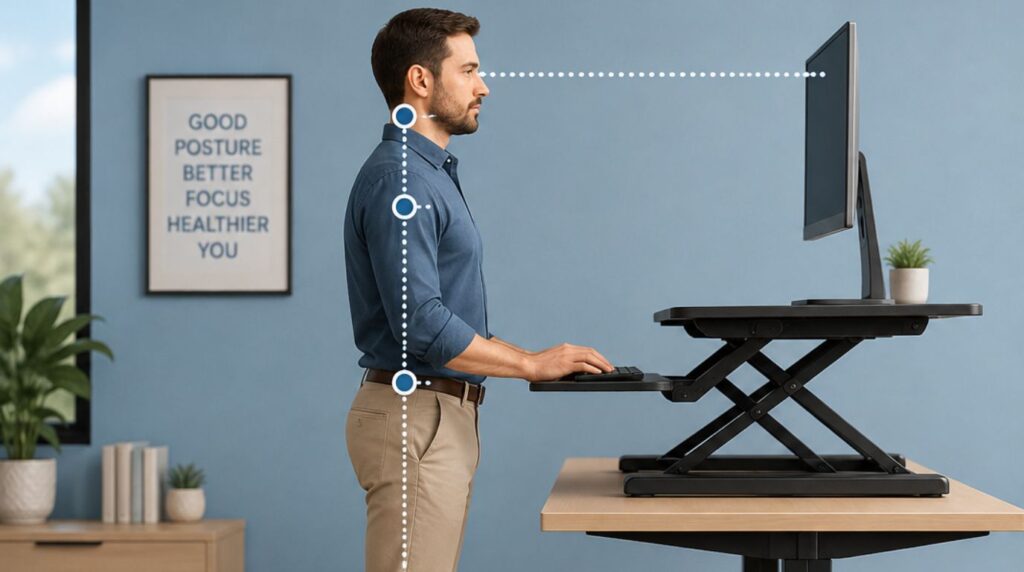
So, what is a riser desk in practical terms? It is a raised, adjustable work surface that is placed on top of a traditional desk. The platform holds your computer equipment and can be moved up or down to create a more flexible working position.
Most models have a main platform for a monitor or laptop and, in many cases, a separate keyboard tray. The entire unit can be adjusted to different heights. This allows you to change from a seated position to a standing position without moving your existing desk.
The adjustment system depends on the design. Some models use a hand-operated lever, while others use springs, gas-assisted mechanisms, or electric motors. Electric models usually allow height changes at the push of a button, while manual versions may be simpler and require no power.
A typical setup works like this:
- Place the converter securely on your existing desk.
- Put your monitor, laptop, keyboard, and other equipment on the appropriate surfaces.
- Adjust the platform to a comfortable seated height.
- Raise it when you want to work while standing.
- Lower it again when you want to return to sitting.
The important point is that the converter moves the working equipment rather than replacing the entire desk.
Why Are Riser Desks Becoming Popular?
The growing interest in flexible workspaces has made desk converters more common in home offices, shared workspaces, and traditional offices.
Many people spend long periods working at computers. Remaining in exactly the same position throughout the day may feel uncomfortable, particularly when the workstation is poorly adjusted. A height-adjustable platform gives users another option: they can change their working position instead of being limited to a fixed-height desk.
This does not mean standing all day is automatically better than sitting. The main advantage is the ability to alternate between positions and introduce more movement into the working routine.
Research has found that sit-stand workstations can reduce the amount of time people spend sitting during working hours, although evidence for broader health outcomes is more nuanced.
For many users, the practical benefit is simply having greater control over their workstation.
What Are the Main Types of Riser Desks?
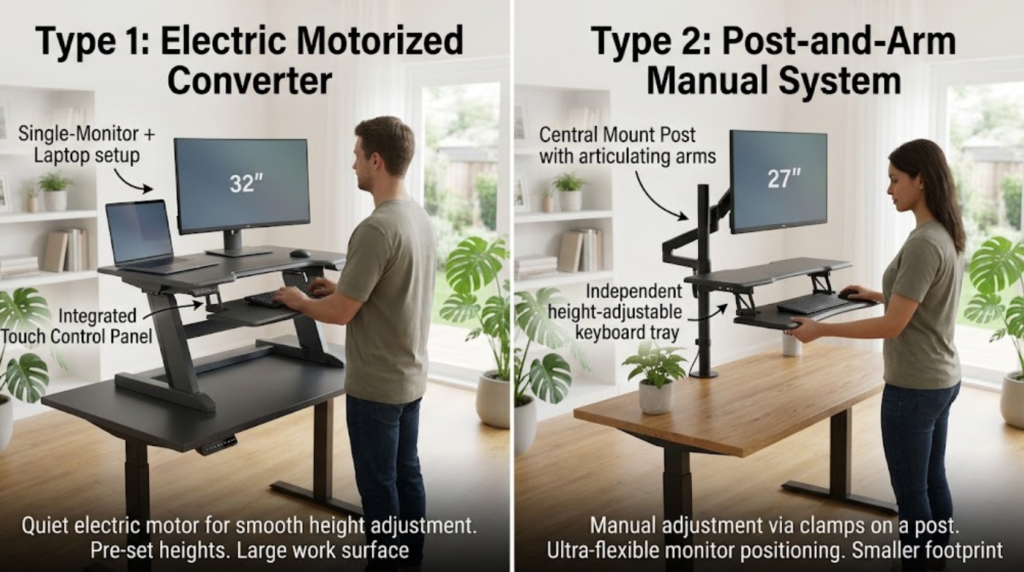
Not every desk converter has the same design. Understanding the main types can make the buying process easier.
Manual Riser Desks
Manual models use a lever, handle, or mechanical adjustment system.
They are generally straightforward to operate and do not require electricity. This can make them useful for people who want a simple workstation without adding another powered device to their desk.
A manual model may be a good option if you only change height a few times during the day.
Spring-Assisted Riser Desks
Spring-assisted models use mechanical assistance to make the platform easier to raise and lower.
The lifting mechanism helps compensate for the weight of the equipment placed on the platform. These models can provide a useful middle ground between basic manual designs and powered systems.
Electric Riser Desks
Electric models use a motor to move the platform.
They are particularly convenient if you change height frequently. With a button or control panel, you can move between sitting and standing positions without manually lifting the workstation.
The disadvantages can include a higher price, greater weight, and the need for a power connection.
Fixed-Height Desk Risers
Some products are simply designed to raise a monitor, laptop, or keyboard to a higher position.
These are not necessarily true sit-stand converters because they may not provide adjustable height. They can still be useful for improving the position of individual equipment, but they do not offer the same flexibility as a full-height-adjustable platform.
What Are the Benefits of a Riser Desk?
Understanding what is a riser desk is only the beginning. The more useful question is why someone would choose one.
It Lets You Alternate Between Sitting and Standing
The biggest advantage is flexibility.
You can lower the workstation for seated work and raise it when you want to stand. This makes it easier to change position during the day without moving to another workstation.
Rather than thinking about sitting and standing as competing choices, consider the converter a tool that allows you to use both positions.
It Works With Your Existing Desk
If your current desk is sturdy and large enough, you may not need to replace it.
A desktop converter sits on the surface you already own. This can be useful if you like your current desk, have limited furniture space, or do not want to spend money on a complete standing desk.
It Can Be Useful in Small Workspaces
A full standing desk can take up considerable floor space. A converter uses your existing desktop, which can make it practical for bedrooms, apartments, home offices, dorm rooms, and compact work areas.
It Can Be Moved
Some models are relatively easy to move between rooms.
This can be useful for people who work in different locations or share a workstation with another person. Compact models may also be easier to store when they are not being used.
It Can Support Better Workstation Positioning
A height-adjustable platform gives you more control over the position of your monitor and keyboard.
However, simply raising the desk does not guarantee good ergonomics. The screen, keyboard, mouse, chair, and your body position all need to work together.
It May Help Reduce Sitting Time
One reason people choose sit-stand equipment is to spend less time continuously seated during work.
The goal should be regular position changes rather than replacing sitting completely. Standing for extended periods can also become uncomfortable, so balance is important.
Is a Riser Desk Good for Ergonomics?
A properly adjusted converter can help create a more flexible workstation, but it is not an automatic solution for every ergonomic problem.
The monitor should generally be positioned directly in front of you, with the top of the screen around eye level or slightly below. OSHA guidance also emphasizes maintaining comfortable positions for the head, neck, arms, wrists, and other parts of the body while using computer equipment.
When setting up your workstation, pay attention to several areas.
Monitor Position
Your monitor should be directly in front of you rather than far to one side.
If you constantly turn your head to view the screen, the position may become uncomfortable over time.
Keyboard and Mouse Position
Your keyboard and mouse should be close enough that you do not have to reach forward repeatedly.
Your elbows should remain relatively close to your body, and your wrists should not be forced into an uncomfortable angle.
Screen Distance
The screen should be far enough away for comfortable viewing without requiring you to lean toward it.
The ideal distance varies by person, screen size, and vision needs.
Standing Height
When standing, adjust the platform so your arms can work comfortably without your shoulders being raised.
Do not assume that a higher setting is automatically better.
Sitting Height
The lowest position matters just as much as the highest position.
If the platform remains too high when lowered, your seated posture may become uncomfortable. Always consider both positions before buying a model.
How Do You Set Up a Riser Desk Correctly?
A good setup begins with measurements rather than guesswork.
Start by checking your existing desk height and your own preferred seated and standing positions. Then consider the height of your monitor and the position of your keyboard.
Place the monitor directly in front of you and adjust its height so you can view the screen without repeatedly bending your neck.
Next, place the keyboard and mouse where you can use them without reaching too far forward.
When standing, keep your shoulders relaxed and avoid leaning toward the screen. Your feet should feel stable, and you should be able to change position comfortably.
When sitting, check that the chair, keyboard, and monitor still work together.
If you use a laptop, remember that raising the screen also raises the built-in keyboard. For longer work sessions, an external keyboard and mouse may provide more flexibility.
What Is a Riser Desk Compared With a Standing Desk?
The two options serve similar goals but work differently.
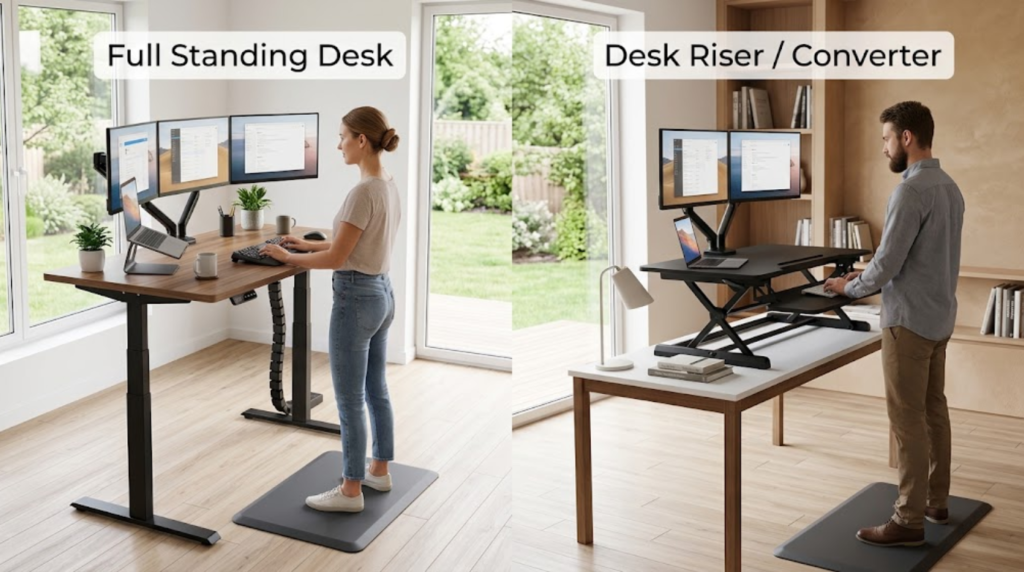
A riser desk is placed on top of an existing desk. A full standing desk replaces the traditional desk and raises the entire desktop.
| Term | What It Is | Installation | Portability | Cost |
| Riser desk / desk riser / standing desk converter | Sits on top of an existing desk | Not required | Highly portable | Generally more affordable |
| Standing desk | A full desk unit with a fixed or motorized height-adjustable frame | Replaces your current desk entirely | Fixed in place | Higher cost |
| Sit-stand desk | Often another term for a standing desk with adjustable height settings | Replaces your current desk | Fixed in place | Varies, often motorized versions cost more |
Once you know what is a riser desk, the next step is understanding the benefits it offers for comfort productivity and ergonomics.
Why Use a Riser Desk?
Better Posture and Ergonomics
One of the biggest reasons people look into what is a riser desk is ergonomics. Sitting in the same position for hours can strain your neck, shoulders and lower back. A riser desk lets you raise your screen to eye level. It also helps you adjust your posture as needed. This can reduce strain from sitting at a fixed desk.
More Movement Throughout the Day
A riser desk makes it easy to change position each hour, stand during video calls or raise your workspace for a focus boost. This type of movement improves circulation and reduces fatigue during long workdays.
No Installation or Furniture Changes
Because a riser desk simply sits on top of your current desk, there is no need for tools, drilling or replacing furniture. This makes it ideal for renters, shared offices or anyone who does not want to commit to a permanent setup change.
Portable and Space Saving
Many riser desks are lightweight enough to move between rooms or even carry to a coworking space. When folded, they occupy minimal storage space which is a major advantage over bulky, fixed standing desks.
Who Should Consider a Riser Desk?
A riser desk is worth considering if:
- You work from a small home office with limited space.
- You split your time between multiple work locations.
- You share a desk or workspace with others.
- You want better ergonomics without replacing your current furniture.
- You need a lightweight, mobile solution you can pack away easily.
Who May Prefer a Full Standing Desk?
A converter is not the best choice for every person.
A full standing desk may make more sense if you need a large uninterrupted workspace or use several heavy pieces of equipment.
You may prefer a complete desk if:
- You use multiple large monitors.
- You need substantial desktop space.
- Your existing desk is unstable.
- You want the entire desktop to change height.
- You have heavy equipment.
- You need more open space beneath the workstation.
- You are creating a new office rather than modifying an existing one.
The right choice depends on the equipment you use and the space available.
How to Choose the Right Riser Desk
- When deciding what is a riser desk for your needs, focus on specifications rather than appearance alone.
- Check the Height Range
- The platform should be comfortable at both sitting and standing heights.
- Measure your existing desk and consider your own height before choosing a model.
- Check the Weight Capacity
- Add together the weight of your monitor, laptop, keyboard, speakers, and other equipment.
- Never assume that a large platform automatically supports heavy equipment.
- Measure the Surface
- Make sure there is enough room for your monitor, keyboard, mouse, and other essential items.
- A platform that looks spacious in a product photograph may feel crowded once your equipment is placed on it.
- Consider Stability
- Stability becomes especially important when the platform is fully raised.
- A workstation that wobbles whenever you type can quickly become frustrating.
- Look at the Keyboard Tray
- Some models include a separate keyboard platform.
- This can help keep the keyboard lower than the monitor, which may make it easier to create a comfortable working position.
- Consider the Adjustment Method
- Think about how often you will change height.
- If you switch positions several times a day, a smooth and easy adjustment system may be worth paying more for.
- Consider Portability
- If you plan to move the unit frequently, check its weight and dimensions.
- A large electric converter may provide excellent functionality but may not be practical to carry between rooms.
- Check Cable Management
- Monitor and power cables need enough length to accommodate height changes.
- A poorly managed cable can become stretched or tangled when the platform moves upward.
Want to discover more helpful content? Browse all articles on Invisigals for detailed guides, expert analysis and the latest updates across a wide range of topics.
Can You Use a Riser Desk With Two Monitors?
Yes, but the model must be designed for the additional size and weight.
Before buying a converter for a dual-monitor setup, check:
- Maximum weight capacity
- Platform width
- Platform depth
- Monitor stand size
- Stability at maximum height
- Cable length
- Available keyboard space
A small converter designed for one laptop may not be suitable for two large displays.
If your setup includes heavy monitors, use the manufacturer’s specifications rather than guessing.
Can You Use a Riser Desk for Gaming?
A gaming workstation can work with a desk converter, but gamers should pay particular attention to stability and space.
Gaming setups often include large monitors, speakers, controllers, keyboards, mice, and other accessories. These items can quickly consume the available surface area.
Before using a converter for gaming, check the total weight of your equipment and compare it with the platform’s rated capacity.
You should also consider whether there is enough room for your keyboard and mouse at the same time.
Can You Use a Riser Desk With a Laptop?
Yes. In fact, a laptop can be one of the simplest setups for a compact converter.
However, laptop users should think about screen and keyboard height separately.
If you raise the laptop screen to eye level, the keyboard may become too high for comfortable typing. An external keyboard and mouse can solve this problem by allowing the screen and input devices to sit at more suitable positions.
This is particularly useful if you work on a laptop for several hours each day.
What Mistakes Should You Avoid?
Knowing what is a riser desk does not automatically mean you will choose the right one. Several common mistakes can make a converter less useful.
Choosing Without Measuring
Do not purchase a model before checking your desk dimensions and equipment.
Ignoring the Lowest Height
Some buyers focus only on the maximum standing height. The lowest setting is equally important if you want to alternate between sitting and standing.
Overloading the Platform
Always stay within the manufacturer’s recommended weight capacity.
Choosing a Small Surface
A compact platform may look convenient but become uncomfortable if your monitor, keyboard, and mouse have to compete for space.
Assuming Standing Is Always Better
The purpose of an adjustable workstation is to give you more options.
You do not need to stand continuously. Alternating positions and moving throughout the day can be more practical.
Ignoring Cable Length
Make sure cables can accommodate the full range of movement.
Buying Only for Appearance
A stylish design is useful, but stability, height range, weight capacity, and surface size matter more.
How Much Does a Riser Desk Cost?
There is no single price that applies to every model.
Cost varies according to size, construction, adjustment system, weight capacity, brand, and additional features. Manual converters are generally simpler, while motorized models can cost more because they include electrical components.
Instead of choosing a model based only on price, compare the specifications with your actual requirements.
A cheaper platform may be perfectly suitable for a laptop, while someone using two monitors may need a larger and stronger model.
Are Riser Desks Worth It?
For many people, yes.
A desk converter can be worthwhile if you already own a good desk and want the ability to change between sitting and standing without purchasing an entirely new workstation.
It can also be a sensible option for small spaces, renters, students, remote workers, and people who share work areas.
However, a converter is not automatically the best choice.
If you need a large desktop, use heavy equipment, or want the entire work surface to move, a full standing desk may provide a better experience.
The key is to choose based on your workspace rather than assuming one type of desk will suit everyone.
What Is a Riser Desk Best Used For?
A riser desk is best used for creating a more flexible workstation.
It allows you to keep your existing desk while adding the ability to change working height. This makes it particularly useful when you want to experiment with standing work without making a major furniture change.
It can also be useful when space is limited or when the workstation needs to be moved occasionally.
For people who already have a sturdy desk, the converter approach can provide many of the practical benefits of height adjustment without replacing the entire setup.
Conclusion
Choosing the right workspace setup can make a real difference in how you feel by the end of a long workday. Small changes in how and where you work can have a bigger impact than expected. This is even more true when comfort and movement matter. If you have been delaying setup improvements, now is a good time to explore your options. Find a solution that truly fits how you work best.
FAQs
How much does a riser desk typically cost?
Prices usually range from $50 to $250, depending on size, materials and lift mechanism.
Can you use a riser desk while sitting on the floor or on a low chair?
Yes, most models adjust low enough for floor seating or ergonomic low chairs not just standard desk chairs.
What Is a Riser Desk Best Used For?
A riser desk is best used for creating a flexible workstation that allows you to alternate between sitting and standing without replacing your existing desk.
Do riser desks come pre-assembled?
Most arrive ready to use out of the box, requiring no tools or assembly.
Is a riser desk suitable for gaming setups?
Yes, as long as it supports the weight of your monitor, keyboard and peripherals comfortably.
Can a riser desk damage or scratch my existing desk?
Quality models have non-slip or padded feet designed to protect desk surfaces from scratches.
How do I clean and maintain a riser desk?
A soft, dry or slightly damp cloth is usually enough to avoid harsh chemicals on wood surfaces.
Are riser desks eco-friendly?
Manufacturers make many from sustainably sourced or FSC certified wood, which makes them a more eco conscious choice.